
Selected projects.

Explore five projects in AI, business software, and mobile learning: the problems they address, what was built, and the scope of the work.

Academic
Intelligence

Your university’s knowledge. Guidance students can use.

Configurable academic advising platform

A shared platform. A university-specific delivery.

Academic Intelligence turns university documents and academic policies into a configurable advising platform. In collaboration with University A, we adapted its core technology to the institution’s student data and counseling needs.

Students need answers that reflect the rules of their own institution. Advising staff need to review those answers and update the underlying guidance as policies change. The platform supports both, with source references and a managed knowledge base.

Reusable platform capabilities

Document ingestion and retrieval

Collect source documents, structure academic facts, and retrieve supporting material through hybrid search and related evidence.

Hybrid ontology

Combine keyword and vector search with a graph of concepts and relationships to find evidence relevant to both the question and the academic rules behind it.

Knowledge management and publishing

Keep each institution’s knowledge separate, review policy updates, manage releases, and provide source-linked answers through chat and embedded web widgets.

Custom development for University A

Institution-specific policies

Adapt academic terminology, curriculum documents, advising policies, and degree requirements to the university’s own system.

Student data and academic checks

Integrate student records and implement rule-based checks for credits and academic requirements as part of the university-specific work.

Advising tools and reports

Support academic assessments, study plans, course roadmaps, and counseling reports tailored to the university’s advising process.

What we built

A system that uses university documents to support student questions and staff-led advising. Knowledge retrieval and policy management form the reusable core; student data integrations and counseling tools are customized for the institution.

Discuss an AI knowledge project

Student-specific checks and reports were developed for University A and are not included in the standard platform.
AI CCTV
Control System

Analyze on the device. Manage from Windows.

Jetson Orin 8GB / Windows

Edge AI for compact hardware.

An AI video monitoring system designed for Jetson Orin 8GB. Video analysis runs on the edge device, while a Windows application handles device configuration and event management.

The edge device analyzes video and reports detection events and device health to the control center. Each part has a defined role, from local processing to day-to-day device operations.

Camera input

RTSP

Stream connection and recovery

Jetson Orin 8GB

On-device video analysis

Detection · recording · health reporting

Windows control center

Device settings and event history

Onboarding · configuration · event search

Designed for Jetson Orin 8GB

The lightweight edge software coordinates video input, inference, and detection candidates within the device’s resource limits. The control center receives events rather than a continuous video feed.

Tools for device operations

Operators can register devices, set regions of interest, adjust features, and search event history, with connection recovery built into the system. The work covers edge software, control APIs, the Windows application, and installation documentation.

What we built

An integrated edge and control system: compact hardware performs local detection, and operators use a central Windows application to manage devices and review events.

Discuss an edge AI project

Camera count, model selection, and performance require validation for each installation. Recording runs on the edge device; the control center handles events and device management.

Platforms & mobile apps.

INIMOA

Projects and decisions. A shared place to work.

Business workspace / Formerly Orbit

See what needs doing. Understand the decisions behind it.

INIMOA is a business workspace in development, building on the earlier Orbit project. It brings project goals, tasks, decisions, and progress together to support both team collaboration and AI-assisted work.

Task lists rarely tell the whole story. INIMOA brings in the goals, dependencies, and decisions behind the work, so teams can see what is next and what may be holding progress back.

Planning and progress tracking

Organize goals and next steps around task dependencies and milestones. Progress and risk indicators highlight areas that need a closer look.

Project decisions and records

Keep decision documents with the relevant project, supported by activity records and access controls. Team members can refer back to what was decided and why.

What we built

The current workspace extends the Macro platform with project planning and decision-management workflows. Development spans Rust APIs, database queries, and SolidJS interfaces, with the product still evolving.

Discuss an internal platform

A Community

Member conversations. Content worth exploring.

Community platform & content automation

A community platform, from posts to publishing.

A Community is a web platform for member discussions and curated public content. The project covers the member experience, moderation tools, and background content collection.

The brief called for more than a discussion board: members needed ways to contribute, and operators needed to manage posts, publish notices, and maintain a regular supply of content.

Member and moderation features

Boards, posts, comments, profiles, and notices support everyday participation. Content management and moderation tools support the people running the community.

Automated content collection

Background workers collect and process public content. Job status tracking helps operators identify failed tasks and recover interrupted processing.

What we built

A community service with member-facing pages, operator tools, and automated content collection. The implementation covers both the visible website and the background processes it relies on.

Discuss a community platform

Inkana

Learn Japanese. One character at a time.

Japanese handwriting / Native mobile app
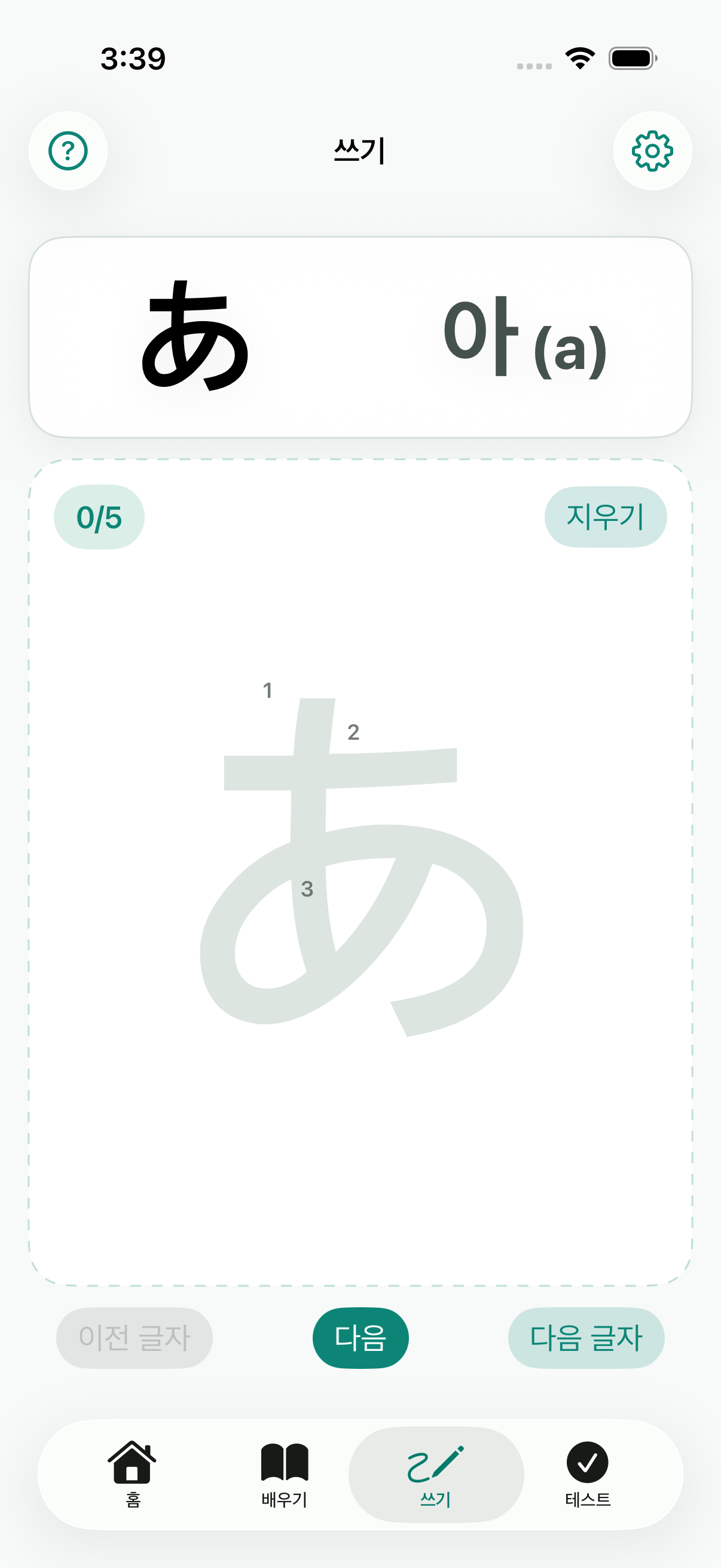
Inkana Japanese handwriting practice screen
Inkana’s handwriting practice screen

Handwriting practice with instant feedback.

Inkana is a native mobile app for learning Japanese through handwriting. Learners write characters on screen, get immediate feedback, and revisit the ones they find difficult.

Character recognition is part of a broader learning flow. Practice, feedback, progress tracking, and review work together to guide the learner through each session.

On-device handwriting recognition

Native drawing input and on-device character recognition provide feedback as learners practice. Targeted review helps them return to material that needs attention.

Learning progress, accounts, and subscriptions

The iOS app includes learning progression, user accounts, and subscriptions. An Android version is also in development.

What we built

A native learning app that combines on-device recognition with structured practice and review. The work spans the learning experience, device-level AI, and the account and subscription features of the product.

Discuss a mobile app

Have a project in mind? Let’s talk.

Get in touch